







Abstract
Motivation
The research field of user interface design has emerged with a large community, several journals and regular conferences. Well-designed interfaces have been identified as a driving force behind business success. There have been numerous examples of bad design resulting in technology being discarded or even labeled as erroneous, when in fact the problem is that the consumers have just failed to understand its functionalities. In one study, it was shown that half of all “malfunctioning products” returned to stores by consumers are in full working order, but that customers cannot figure out how to operate the device [7].
Older adults constitute a challenging user group with special needs and abilities. This is a heterogeneous group with rapidly changing characteristics and requirements, as ageing may bring impairments in vision, hearing, mobility, dexterity and cognitive skills in a higher degree. Older adults are vulnerable. Today, there is often a mismatch between available services and their user-friendliness, which can reduce the usage of many services from which older people could benefit. The success of these services depends on their ability to provide user interaction that is accessible to their users.
To increase the benefits for older adults using Information and Communication Technology (ICT)-based products and services, developers and service providers must not only focus on the functionality itself but also, even especially, on the user interface. An appropriately and correctly designed user interface will guide the user to understand the underlying service – a vital precondition for the service’s intended usage. A fundamental prerequisite of this is the personalization or adaptation of user interaction to user needs. Individuals need accessible user interfaces for their preferred ICT devices and services.
The purpose of this paper is to provide a generic framework for designing and deploying user interfaces that are tailored to particular user groups. In the light of this framework, three concrete systems – AALuis, GPII/URC and universAAL – are analyzed and compared. These systems have been chosen because of the authors’ involvement in them. However, it is claimed that they represent a wide variety of current systems for the design of flexible user interfaces, and can therefore be considered as typical. The study was initiated by an intensive face-to-face workshop which focused mainly on the technical aspects of user interfaces and their generation. A typical application area for these systems is Ambient Assisted Living (AAL), but they are not restricted to this domain and are rather generally developed for the design and generation of flexible user interfaces.
The remainder of this paper is structured as follows: In Section 2, one finds a short description of related work regarding conceptual frameworks for technical comparisons. Section 3 introduces some concepts and terms, and defines a generic framework for the design of adaptive user interfaces, providing a basis for the comparison of systems. Section 4 describes the three selected systems, focusing on the design of adaptive user interfaces. In Section 5, the criteria for the comparison of the systems are given followed by a detailed analysis of the three systems in light of these criteria. In Section 6, the results of the qualitative comparison are summarized and discussed. Finally, Section 7 provides conclusions and elaborates on possible extensions and combinations of the systems.
Related work
Comparing different systems in a holistic way is a challenge, since various aspects need to be considered. These include both technical and user-oriented aspects. This paper focuses in particular on the technical potential and system features. It does not cover user aspects such as usability and acceptance from the end-user point of view, nor the ease of use for developers, although both of these are important issues on the one hand for the acceptance of user interfaces and on the other hand for development costs.
There do exist conceptual frameworks available for the technical comparison, but these focus just on particular aspects to be considered for user interface adaptation. Examples of these from the literature are as follows: (a) models as basis for the user interface generation [16,21], (b) methods used for the user interface generation [38], (c) tools supporting the generation process [23], (d) the final user interface [34], or (e) multi-modality [5,15]. These aspects are important, but do not cover the whole user interface adaptation process as described in Section 3 and hence do not fulfill our intended purpose. Thus, more specific comparison criteria have been formulated, taking the state-of-the-art into account. Additionally, the Cameleon Reference Framework (CRF) [3], which defines four levels of abstraction for user interface models, is used for a final summary of the three systems in Section 4.4. It is again a very useful framework for the comparison, but does not cover the whole process as described in Section 3.
Introduction to user interface adaptation
User interface adaptation covers different stages in the design and lifecycle of user interfaces, and there are various terms, concepts and aspects to consider.
User interface adaptation aspects

Some aspects of user interface adaptation, depicted in a 3-layer user interface model.
User interface adaptation can change any aspect of a user interface. Figure 1 illustrates some adaptation aspects and organizes them within our 3-layer model, which breaks a user interface down into layers for
In the process of adapting a user interface, at least one of the three user interface layers (see Section 3.1) is adapted to a specific
Adaptable versus adaptive user interface
A system is said to have an
A framework for user interface adaptation

The general process of user interface adaptation, spanning the overall development and rendition process from design time to runtime.
Figure 2 illustrates the process of user interface adaptation in general, spanning design time and runtime. At design time, the application developer creates an abstract user interface that leaves some leeway with regard to its final rendering (see Section 3.5 for a more detailed description of the adaptation process and its actors). The format of the abstract user interface varies significantly between technologies. Some technologies employ task models, some use abstract forms of widgets and controls, some state diagrams, and some employ semi-concrete user interfaces that can be parameterized at runtime. Of course, these approaches can be combined as well.
Between the design of the Abstract User Interface (AUI) and usage at runtime, user interface resources may be prepared in advance by user interface designers or automatic systems (or both). At this point, assumptions (projections) are made for the context of use at runtime. The goal of this activity is to have some building blocks of a Concrete User Interface (CUI) “in store” that would otherwise be impossible for generation at runtime.
At runtime, when the user interacts with the system, the actual context of use is known, and the Final User Interface (FUI) is built as an instantiation of the abstract user interface. If user interface integration is involved, the final user interface employs suitable user interface resources that have been prepared before runtime. As a possible complication, the context of use may change during runtime, and the concrete user interface may adapt immediately to the change.
User interface adaptation is a complex process typically occurring at both design time and runtime. Each of these time points has its own opportunities and constraints. At design time, a human expert can create sophisticated user interfaces with variations for adaptation. However, designers do not know the exact context of use that will occur at runtime. Therefore, they have to make guesses and provide internal (i.e., built-in) or external (i.e., supplemental) variations that will be selected at runtime. At runtime, the context of use is available, and can be used to pick and/or tailor an appropriate user interface. However, the user interface must be available immediately for rendition, therefore human design is out of reach at runtime.
Based on the general process of user interface adaptation (see Fig. 2), the following typical steps were identified as relevant for the adaptation of user interfaces, each occurring at some point between design time and runtime, inclusive (Note that some design approaches only support a subset of these steps):
Matching approaches are out of scope for this framework, but may involve automatic inference mechanisms, a user’s explicit choice, or a reactivation of a previous user choice.
This process can vary depending on the overall development approach and toolset used, the user interface quality requirements, the availability of user interfaces, the availability of use context parameters and other influences. For example, the application could be monolithic, with its user interface and business logic lumped together. In this case, the developer would develop the application’s user interface model (step 1), the default user interface (step 2) and (optionally) supplemental user interfaces (step 3). Also, rather than having a human designer create a user interface (steps 2 & 3), it could be generated automatically based on the abstract description and other resources. In this case, the design of user interfaces could be deferred until runtime, when the exact context of use is known, and a resource repository (step 3) might not be needed, since the “best-matching” user interface would be generated on demand in real-time. Furthermore, user interface accommodation and customization may be combined as a mixed dialog, i.e., steps 5 and 6 can occur any number of times in an interwoven fashion.
The three systems – AALuis, GPII/URC and universAAL – are respectively described in the following sections and finally summarized with respect to the user interface levels of the Cameleon Reference Framework (CRF) [3] (see Section 4.4). The framework is used as a joint overview of the three systems and as a wrap-up of the bottom-up approach.
AALuis
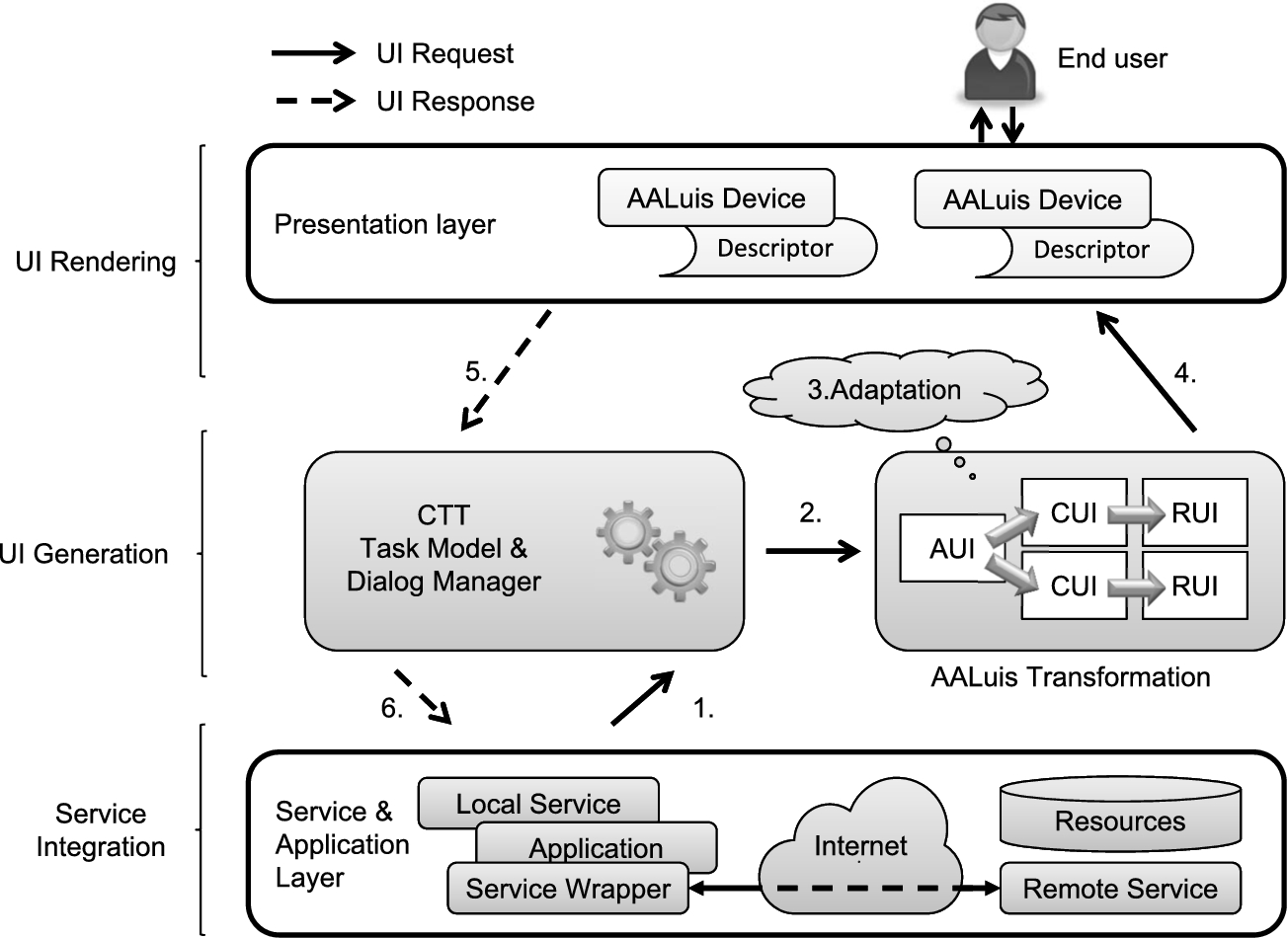
AALuis user interface generation framework.
AALuis is a framework mainly focusing on the user interface generation [18] and covers all steps of user interface adaptation as described in Section 3.5. Figure 3 illustrates components of this framework together with the information flow from the calling service/application to the end user and back. It covers the service integration, the user interface generation and the user interface rendering. The information flow starts with the connection between the digital service and the task model, which models the interaction between the user and the system (step 1 in Fig. 3). Each task describes the logical activities that should support users in reaching their goals [31] and each task is either a user, system, interaction or abstract task [33]. Next, in light of the task model, model interpretation yields a set of currently active interactions (step 2), and the user interface is transformed and adapted (step 3). Finally, the interaction between the user and the functionality of the service completes the information flow (steps 4–6).
The framework can either be used with local or remote services. The former are integrated as separate OSGi bundles and the latter are loosely coupled as Web services, which allows an easy connection of any platform to the system. Services are described in a twofold manner by two separate files: the first defines the task model of the service in Concur Task Trees (CTT) notation [32,33], and the second one provides a binding of the service methods and parameters to the CTT tasks. Optionally, a description of additional resources used for different output modalities can be provided.
The user interface is generated at runtime based on the interaction – specifically, using the task model provided by the CTT. Final results of the automatic transformation process are renderable user interfaces (RUIs) in HTML5, which are dynamically generated for every specific I/O channel. The flexible transformation approach also supports other output formats, such as VoiceXML [30], and thus allows the usage of a wide range of I/O devices. There is a set of default transformation rules for different devices available and additional ones can be provided.
The generation process takes into account not only the task model but also additionally available information. Besides the I/O devices and their capabilities, this information also comprises user and environmental contexts [19]. The task model and the Abstract User Interface (AUI) – which is derived from the task model and which is device and modality independent – are enriched step by step to create a device and modality dependent user interface that is optimized for a specific I/O channel, i.e., the final renderable user interface. The abstract user interface and the intermediate steps of the transformation process (i.e., the concrete user interfaces or CUI), are described in MariaXML [35], a model-based language for interactive applications.
In Fig. 4, one can see an example of a user interface for the television generated by the AALuis system. This user interface is generated solely based on the provided task model in CTT notation and the actual context of use. The presented graphical user interface uses an avatar as a virtual presenter of information. This creates additional value by adding a visual display to the verbal information.

Example of a user interface generated by the AALuis system for a TV.
In the following, a combination of the Universal Remote Console (URC) [14,43] and the Global Public Inclusive Infrastructure (GPII) [44] technologies, and their main components is introduced.
Universal Control Hub (UCH)
The Universal Control Hub (UCH) architecture is a middleware-based profiling of the URC technology. It allows for any kind of controller to connect to a middleware unit that in turn communicates with one or more applications or services, called

Overview of the Universal Remote Console (URC) architecture.
When a target (e.g., a television) is discovered by the UCH, it requests and downloads an appropriate target adapter (TA) from the resource server. Then, a user interface socket for that target is instantiated in the UCH’s socket layer. The variables, commands and notifications in the user interface socket represent the state of the connected target. If multiple targets are connected to the UCH, each one has an associated user interface socket as a means to access and modify the target’s state.
When the user connects with his/her controller (e.g., a smartphone) to the UCH, the controller receives a list of connected targets and user interfaces that are available for remote control. The UCH may download a number of user interface resources from the resource server in order to build the final user interface. More specifically, only those user interface resources which are suitable for the actual context of use (i.e., the user and his/her controller device) are downloaded and presented. It is up to the User Interface Protocol Module (UIPM) to decide how to interact with the controller (i.e., in which protocol and format), but most commonly HTML over HTTP is used. Multiple UIPMs can be present in the UCH at the same time, offering choices of protocols and formats, and the controller can pick the most suitable one.
Pluggable user interfaces can be written in any programming language and run on any controller platform. Currently, most user interfaces are based on HTML, CSS and JavaScript, communicating with the user interface socket via the URC-HTTP protocol [41], using AJAX and WebSockets as communication mechanisms. Thus, they can simply run in a controller’s Web browser, and no prior installation is needed on the controller side.
The UCH components (target adapters, user interface protocol modules) have open APIs and can be downloaded on demand from the resource server at runtime, thus providing a fully open ecosystem for user interface management.
Currently, the German research project SUCH (Secure UCH) develops a UCH implementation with special security and safety mechanisms built-in, focusing on confidentiality, privacy and integrity of data as well as non-repudiation and access policies based on a role concept. The implementation is guided by the ISO/IEC 15408 Common Criteria [6] methodology for IT security evaluation and aims to be a certified open-source implementation of the UCH at the Evaluation Assurance Level 4 (EAL4).
The openURC resource server (see Fig. 5) is a repository for arbitrary user interface resources. It is used as a deployment platform for application developers and user interface designers. The resource server acts as a marketplace for the distribution of target adapters, user interface socket descriptions, user interface protocol modules, and user interface resources that may or may not be specific to a particular context of use. The resources are tagged with key-value pairs for searchability, following the Resource Description Protocol 1.0 standard [27] of the openURC Alliance [26].
Controllers and UCHs can download appropriate components from the resource server upon discovery of specific targets and requests for user interface resources specific to user preferences, and device and environment characteristics. Controllers and UCHs access the resource server through a REST-based protocol [28], which is standardized by the openURC Alliance.
GPII personal preference set
While the URC enables pluggable user interfaces (in any modality) designed for specific user groups in a specific context of use, it does not define a user model (needed for step 4 in Section 3.5), nor does it actively support user-driven customization at runtime (cf. step 6 in Section 3.5). However, the Global Public Inclusive Infrastructure (GPII) defines a so-called
Integration of URC and GPII technologies

A demonstrational online banking user interface, based on the GPII/URC platform. Through the Personal Control Panel (shown on the top of the screen) the user can set presentational and other adaptation aspects. Sign language videos are available for the input fields via a special icon. The screenshot shows a video in international sign language (with a human sign language interpreter) for the input field “account number”.
Taken together, the combination of the URC technology and the GPII technology covers all steps of user interface adaptation, as described in Section 3.5. URC with its user interface socket provides the abstract user interface description and the concept of pluggable user interfaces. These user interfaces may be parameterizable to respond to a user’s preference set, a device’s constraints and/or a situation of use. At runtime, a user’s preference set is downloaded from the GPII preference server, or read from a local repository (e.g., a USB stick). In addition, device and environment characteristics are captured by the GPII device and runtime handlers. In essence, URC provides a roughly matching user interface (user interface integration), and GPII allows for further fine-tuning (user interface parameterization) to achieve an optimal adaptation for the user, the device and the environment. This mechanism even allows for fine-tuning during runtime, in order to react to changing conditions of use (e.g., ambient light or noise).

universAAL User Interaction management framework.
Figure 6 shows a demonstrational online banking application whose Web interface has been manually designed, based on the GPII/URC platform. At the top, the Personal Control panel allows the user to customize presentational and other aspects of the Web interface. In this demo application, video clips in sign language have been prepared by a third party, giving a detailed explanation for each input field of the wire transfer form. If the user sets their preferences to include sign language output, they will see small sign language icons next to the input fields, and pressing them will show an overlay window with a human sign language interpreter or sign language avatar (whatever is preferred and is available).
The universAAL UI framework is a product of a consolidation process including the existing AAL platforms Amigo, GENESYS, MPOWER, OASIS, PERSONA, and SOPRANO [11] in order to converge to a common reference architecture based on a reference model and a set of reference use cases and requirements [40]. As a result of the work done, the universAAL Framework for User Interaction in Multimedia, Ambient Assisted Living (AAL) Spaces was accepted as Publicly Available Specification by the International Electrotechnical Commission under the reference IEC/PAS 62883 Ed. 1.0.
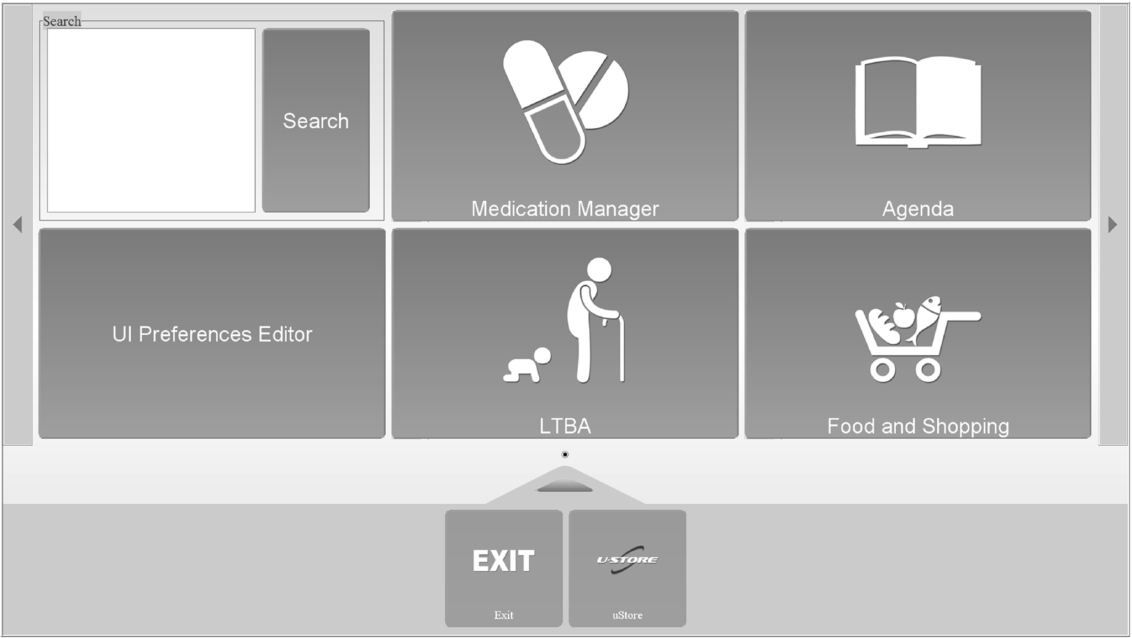
Example of a generated user interface by the universAAL framework.
Figure 7 illustrates components of the universAAL UI framework together with the information flow from the calling application to the end user and back. The UI framework consists of the following parts:
The User Interaction Bus (UI Bus) includes a basic, ontological model for representing the abstract user interfaces and means for exchanging those messages between UI Handlers and applications.
The UI Handler is the component that presents dialogs (payloads of UI Requests) to the user and packages user input into UI Responses that carry the input to the appropriate application. UI Handlers ensure similar or same look and feel across various applications and devices, which helps the user to quickly become accustomed to the system. Different UI Handlers have different capabilities in terms of supported modalities, devices, appropriateness for access impairments, modality-specific customizations, context-awareness capabilities, etc.
The Dialog Manager manages system-wide dialog priority and adaptations. It adds adaptation parameters (e.g., user preferences) to the UI Requests coming from the application and returns it to the UI Bus. There, the UI Bus Strategy decides which UI Handler is most appropriate for the interaction with the user in this specific moment (considering current context and information, such as user location).
The universAAL resource server stores and delivers resources, such as images, videos, etc., which cannot be represented ontologically, to the UI Handlers [39].
In Fig. 8, one can see an example of a user interface generated by the universAAL framework. The main screen of the universAAL system for the assisted person rendered by the UI Handler GUI Swing is shown. It displays an example setup where Medication Manager, Agenda, Long Term Behaviour Analyzer (LTBA) and Food and Shopping services are installed together with system-provided services for filtering installed services (Search) and changing current setup of user interaction preferences (UI Preferences Editor).
Figure 9 gives a summary of the three systems for user interface adaptation in terms of the user interface levels of the Cameleon Reference Framework (CRF) [3]. The Cameleon Reference Framework structures the user interface into four levels of abstraction, from task specification to the running interface. The level of tasks and concepts corresponds to the Computation Independent Model (CIM) in Model Driven Engineering; the Abstract User Interface (AUI) corresponds to the Platform Independent Model (PIM); the Concrete User Interface (CUI) corresponds to the Platform Specific Model (PSM); and the Final User Interface (FUI) corresponds to the program code [37]. Figure 9 presents the equivalents to these levels for each of the three systems. GPII/URC and universAAL have equivalents for two and three of the four abstraction levels respectively, and AALuis has all four.

Relation of the three systems with respect to the Cameleon Reference Framework (CRF).
In the following, the three systems are described in detail based on ten defined comparison criteria. The criteria have been developed by the authors based on the generic framework presented in Section 3.4. The motivation behind all ten criteria is to cover all steps for user interface adaptation and to allow for a qualitative comparison of the three systems. Each criterion is briefly presented with respect to the framework and literature. The first eight are directly related to the generic framework (see Section 3.4) and the last two indirectly. All of them are of general importance for adaptive systems. After the short description of each criterion, the systems are described based on some guiding questions. The main attention has been on overlapping and complementary aspects to highlight the possibility to create added value by combining these different systems or by enriching one of the systems by selected features.
Form of abstract user interaction description (C01)
A separation of the presentation (i.e., user interface) from the application and its functionality is helpful to ensure that service developers can focus on the application development (cf. step 1 in Section 3.5) and do not need to be concerned with the user interface or any special representation required by the target group [19] (cf. steps 2 & 3). As described in the approach of ubiquitous computing [49], it allows the input to be detached from a particular device and to easily exchange I/O devices for interacting with the requested application [17].
In
The
A variable denotes a data item that is persistent in the target, but usually modifiable by the user (e.g., the power status or the volume level on a TV).
A command represents a trigger for the user to activate a special function on the target (e.g., the start sleep function on a TV).
A notification indicates a message event from the target to the user (e.g., a could not connect message on a TV).
An open-source socket builder tool is available for application developers to conveniently create and edit a socket description, along with other URC components and resources (e.g., labels).
The
Dialog descriptions in universAAL enable the composition of abstract representations of the user interfaces. They are based on XForms [2], which is an XML format and W3C specification of a data processing model for XML data and user interface(s), such as web forms [46].
Support for user interface design (C02)
The user interface can be manually designed or automatically generated based on an abstract description of the functionality (cf. step 2 in Section 3.5). Either way, these approaches yield a default user interface which can be supplemented by third parties, and further adapted at runtime. There is a need to support the designer or the system to generate the default user interface, and this support can take various forms.
In
In the
If manually designed user interfaces are too expensive, or if no appropriate user interface is available for a specific application and context of use, it is also possible to generate one based on the description of a service’s socket (in this case, steps 2 & 3 are done by some automatic system at development time or runtime). GenURC [52], part of the openURC resource server implementation, is such a system, transforming a user interface socket and its labels into a Web browser-based user interface. As soon as the socket description, a grouping structure and pertaining labels are uploaded for an application, GenURC generates a user interface in HTML5 that is especially tailored for mobile devices by following the one window drill-down pattern [42]. The result is then made available to clients, along with all other (manually designed) user interfaces for that specific target.
In
Third party contributions (C03)
The provision of additional resources and alternative user interface resources for use in the adaptation process is mentioned in step 3 in Section 3.5. These resources can either be provided locally or globally for the system deployment by the developer him/herself or by third parties, which can be external companies or other user interface designers or experts.
There are several possibilities for contributions by third parties in
In the
In
Context of use influencing the adaptation (C04)
Figure 2 and Section 3.2 describe the context of use, covering information about the user, the runtime platform and the environment, and its importance as a source of information for any adaptation process of the user interface (cf. step 4 in Section 3.5). The context information can be modelled and implemented in various ways.
In the
The
Maintenance of user model (C05)
The user model is an important source for any adaptation of the user interface (cf. step 4 in Section 3.5). Thus, the question arises whether the user model can be changed manually by means of tools or whether changes are done automatically as a result of common user interactions.
All user profile related data in
User interface integration and/or user interface parameterization (C06)
As stated in steps 5 & 6 in Section 3.5, there is a difference between user interface integration and user interface parameterization. In other words, the full user interface or just parts of it are exchanged or the user interface is fine-tuned by setting predefined parameters.
The
The
Support for adaptability and/or adaptivity (C07)
As described in Section 3.3, user interfaces may be adaptable, i.e., the user can customize the interface (cf. step 6 in Section 3.5), and/or adaptive, i.e., the system adapts the interface on its own or suggests adaptations (cf. step 5 in Section 3.5). As stated, hybrid solutions are possible as well. If adaptivity is supported, the matchmaking between the current context of use and the “best” suited adaptation is a delicate and important task for the acceptance of the user interface. There are various matching approaches, including rule-based selections or statistical algorithms.
With respect to adaptability and adaptivity,
In
In
User interface aspects affected by the adaptation (C08)
In Fig. 1, various aspects and levels of adaptation are mentioned and clustered into a 3-layer model approximating the depth of their leverage (cf. step 5 and 6 in Section 3.5). The resulting adaptations can be shallow modifications impacting the presentation & input events layer, medium-deep modifications impacting the structure & grammar layer, or deep modifications impacting the content & semantic layer of the user interface model.
The adaptations in
Regarding
In
Support for multimodal user interaction (C09)
It is generally assumed that multimodal user interaction increases the flexibility, accessibility and reliability of user interfaces and is preferred over unimodal interfaces [8]. It includes input fusion and output fission, which refers to modality fusion when capturing user input from different input channels to enhance accuracy, and modality fission when using different output channels for presenting output to human users [47,48]. It is thus directly related to multimodality regarding input and output channels.
In
The
Support of standards (C10)
Standards play an important role in ensuring exchangeability of user interfaces and compliance with the changes in needs of older adults. They offer, for example, the possibility to prepare user interface generation to run not only on currently available devices, but also on an upcoming generation of devices.
The
The
Discussion
In the following, the results of the above comparison of the three systems are discussed. Rather than highlighting strengths and weaknesses of each system, the aim is to identify use cases best suited for each of the three systems. The section elaborates on similarities and differences with a focus on open issues. Furthermore, possible paths towards consolidation are outlined, with the purpose of increasing harmonization between the systems.
Summary of the comparison of the selected systems
Summary of the comparison of the selected systems
The analysis of the three systems with respect to the comparison criteria reveals many differences and even similarities, although the systems have been developed independently. Table 1 summarizes the comparison of the systems with respect to the ten criteria. It provides a systematic overview of the different approaches followed in the three systems.
All three systems are designed in an open way to support third party contributions (C03). The provision of additional resources is possible in all systems, but realized in different ways, i.e., via an URI (AALuis) vs. the openURC resource server (GPII/URC) vs. the universAAL resource server (universAAL). It is one of the main goals of all systems and a possible aspect for harmonization by creating a single point for resource provision (see Section 6.3.3). A further aspect of third party contributions is the provision of supplemental user interfaces. It is realized by the provision of additional transformations and descriptions of AALuis enabled devices (AALuis) vs. supplemental pluggable user interfaces (GPII/URC) vs. alternative UI Handlers (universAAL).
The systems use similar contexts of use in the adaptation process (C04), but their representations of the context models are different, i.e., key-value pairs based on MyUI (AALuis) vs. the GPII preference set (GPII/URC) vs. standards for the user model (universAAL). The context of use is directly related to the support for adaptability and adaptivity (C07). All three systems under comparison provide this support, whereas the tools are diverse. As a future goal, these tools should be harmonized and possibly merged, to achieve a cross-platform compatibility of contexts of use (see Section 6.3.2).
All systems support user interface integration as well as parameterization (C06) and affect all three layers of user interface aspects (C08). Again, the realization differs between the three systems. For details see Table 1 and Sections 5.6 and 5.8.
The usage of standards is of utmost importance for all three systems (C10), whereas the form differs slightly, i.e., using standards and working drafts (AALuis) vs. already standardized and contributing (GPII/URC) vs. using standards and being available as a specification (universAAL). Supporting standardization activities jointly would create additional possibilities. First feasible joint standardization activities are sketched in Section 6.3.2.
There are differences in the form of the abstract description of the user interaction and interface (C01), i.e., CTT notation for modelling the interaction and MariaXML for the abstract user interface representation (AALuis) vs. user interface sockets constituting a contract between the service back-end and a user interface (GPII/URC) vs. dialog descriptions using XForms (universAAL).
Another distinguishing feature concerns support for the user interface design (C02), i.e., automatic generation based on existing but extensible transformation rules (AALuis) vs. at design time manually crafted,2 It is also possible to automatically generate user interfaces in GPII/URC, but design by human experts is the most common way.
Especially the differences in criteria C01 and C02 allow for a differentiation between the best-suited application areas and constraints of the three systems (see Section 6.2), but also provide a potential for harmonization so that they may mutually benefit from each system’s advantages (see Section 6.3.1).
The maintenance of the user model (C05) is handled differently in all three systems by means of different tools, i.e., customizable persona-based profiles (AALuis) vs. the web-based Preference Management Tool and Personal Control Panel (GPII/URC) vs. initialization of customizable user preferences based on the user role (universAAL). This is again closely related to possible standardization activities and especially to create a common set of maintenance tools taking into account different strengths and avoiding disadvantages (see Section 6.3.2).
Finally, the systems can be distinguished by their support for multimodality (C09), i.e., whether it is supported in the transformation process (AALuis) vs. possible but specific interaction mechanisms are out of scope (GPII/URC) vs. strong support (universAAL). Regarding multimodality, it can be clearly seen that the systems have a different focus – especially for GPII/URC for which it is out of scope. Details can be found in Table 1 and Section 5.9.
Based on the similarities and differences, one can distinguish between application areas best suited for the different systems while highlighting constraints.
The abstract description of the user interaction or user interfaces by task models and XForms (AALuis and universAAL), and the automatic generation thereupon, allow for the provision of a consistent look and feel for any application provided by the system. This is especially helpful for older adults to give them the same feeling and interaction options with the possibility to adapt to their preferences. A problem of automatic generation is that it needs a trade-off between flexibility to cover as many use cases as possible, and usability and accessibility. In contrast, manually designed user interfaces (GPII/URC) facilitate tailoring the user interfaces for special needs, services and special user groups. This allows flexibility in the design of user interfaces, especially with focus on usability. Thus, one should balance pros and cons if the focus is on the same look and feel for different applications but with the slight problem of reducing usability and accessibility (universAAL and AALuis), or if the focus is on tailored user interfaces for each application and target group, but with the drawback of additional development efforts due to the large number of user interfaces to be developed (GPII/URC).
Another difference is the fact that GPII/URC is mainly designed to control appliances and devices as targets while AALuis and universAAL mainly focus on digital services. On the one side, the user interface sockets (GPII/URC) represent the functionality of the targets. On the other side, the interaction with the digital service is modelled by the CTT (AALuis), or via the UI Bus which includes a basic, ontological model for representing the abstract user interfaces and a means for exchanging messages between UI Handlers and services (universAAL).
A major difference between AALuis and universAAL, as examples of automatic user interface generation, and GPII/URC is the fact that for AALuis and universAAL, the user interface is generic for the application and specific to the I/O controller. This means that, when a new service is added to the system, it can be accessed without requiring new code for user interfaces. Furthermore, it allows for a simple modality and device change at runtime. In contrast, for GPII/URC the user interface is specific for the application
Another distinction between the three systems is the additional effort needed to use it, and where in the lifecycle this effort occurs. This is directly related to the first two steps of the generic interface adaptation framework. In AALuis, the overall efforts for using various user interfaces on different I/O controllers are shifted toward the service developer, as the creation of a task model for each application. Thus, a service developer must learn the CTT notation once before getting started. Further transformation rules can be developed by user interface designers and developers if needed, but are not necessary for initial usage of the system, since existing transformation rules can be reused. For GPII/URC, the efforts are more equally distributed between a service (target) developer who defines the socket description and develops the target application, and one or more user interface experts who design interfaces for each target and controller platform. In universAAL, the efforts are focused on the abstract description of the user interaction via the UI Bus by the service developer and the usage of the existing UI Handlers, which are realized in Java and can be extended. The initial effort is mainly related to getting to know the universAAL platform and the underlying concept of ontologies and XForms. In summary, the efforts are clearly distributed differently.
There are differences with regard to how the systems bind to their back-ends, i.e., the applications providing the functionality. AALuis supports the integration of local services as separate OSGi bundles, or remote services as loosely coupled Web services. For the latter option, there is no explicit connector development needed. Thus, there is no service development in the same system necessary, which allows service developers to use existing platforms (so they do not need to migrate to a different development environment). In GPII/URC, a service developer needs to implement a target adapter on the UCH platform (currently in Java) to provide the binding. In universAAL, the application’s connection to the universAAL system is realized by using the service bus via an OSGi bundle. Thus, the application developer needs to integrate his/her developments into the universAAL platform. Summarized, one can say that in AALuis there is no need for additional binding, i.e., developers do not need to develop anything within the AALuis system when connecting a Web service application, rather only to provide the task model. In contrast, in GPII/URC and universAAL, programming is needed to integrate applications into the systems.
Another difference in the systems is the division of roles in the three systems. In GPII/URC, there is a clear separation between the development and design efforts. This implies that user interface designers can provide user interfaces for the system. AALuis and universAAL do not follow a strict separation of roles. To provide new user interfaces for additional I/O devices, new transformation rules and UI Handlers, respectively, have to be implemented.
Work towards harmonization
Harmonization of the three systems can help them to mutually benefit from each others’ strengths. Harmonization can happen at various levels with different efforts. Based on the defined criteria and the comparison, the following possibilities for convergence are identified and envisioned.
Conversion between abstract descriptions of the user interface
The three systems cover different application areas (see Section 6.2). To mutually benefit from their advantages and to allow an interchangeable usage of the three systems, an interface for interlinking the systems on any level should be sought. Providing a single, common, abstract way to describe of the user interaction and interface is not considered to be reasonable, since all concepts have advantages and drawbacks and hence a harmonization would lead to a loss of flexibility. The abstract description is realized in different forms and thus a possible compromise is the creation of (semi-) automated conversion tools.
The idea is to use the CTT notation for the description of the task model, because there is good tool support for the generation and also a runtime simulator available (CTTE [22]). CTT could be the input for the generation of a user interface socket description, which could be used to connect manually designed user interfaces. Conversely, task models or an AUI in MariaXML could be generated from the socket description which could, in turn, be the starting point for the automatic user interface generation. The same conversion tools could be developed to create a user interface description using XForms. All these conversion tools would allow the front-end of one system to be used by the others. In summary, this would finally allow for the use of manually designed user interfaces
Standardization of context models and common set of tools for maintenance
All three approaches use similar context models covering information about the user, the runtime platform and the environment, but unfortunately based on different formats and standards. GPII develops a register of terms for the description of user preferences and platform and environmental characteristics, which will result in a future version of ISO/IEC 24751. Using common terms and values for the models including user preferences, device characteristics and environmental factors would allow for the exchange (import/export) of user preferences and device characteristics between the platforms. Furthermore, the connection of systems for sharing environmental context would be possible, e.g., using the universAAL context bus as input for any adaptations in the other systems. A community process for registration of common terms via the GPII registry server and using a common user preference server would support this idea. A vision of common context models is to share and use the same tools for the maintenance of a user’s preference set and to access a common server with descriptions of device characteristics.
Sharing resources
Sharing resources and supporting third party contributions are of great importance for all three systems, but the provision and description of user interface resources is handled in distinct ways. A common vocabulary for the description of user interface resources via metadata, e.g., realized by key-value pairs, is envisioned to allow for the import and export of resources such as labels, images and videos from one platform to the other. A starting point for the creation process can be the resource property vocabulary [48] by openURC. Besides sharing the resources between systems, a common description would offer the possibility to use a joint platform as a common resource server for uploading and downloading resources for user interface adaptations via user interface integration.
Limitations of the study
Finally, a number of important limitations need to be noted. First, this comparative study does not provide quantitative data for the comparison of the systems. The definition of benchmarks and metrics would allow a more objective comparison, but were out of scope since the focus was on a conceptual comparison. An evaluation through competitive benchmarking, like in the EvAAL competitions for AAL systems [1], would help to obtain quantitative data with respect to e.g., effort needed to use the systems, usability of the (generated) user interfaces, et cetera. Furthermore, the comparison focuses on technical aspects and does not include means to compare the systems from the perspective of the user. Finally, the developers’ perspective is not analyzed from a cost perspective in our comparison. To do so, an empirical study would be needed, which is also out of scope of the presented work.
Conclusion
The purpose of the current study was to provide a generic framework for the design of flexible user interfaces, and to analyze the three systems AALuis, GPII/URC and universAAL within this framework in a detailed comparative study. In this investigation, the aim was to assess differences and similarities of the systems based on ten criteria. As a result, the best-suited application areas, system constraints and possibilities of harmonization of the systems were elaborated.
The following conclusions can be drawn from the present study. First, although independently developed, all three approaches show similarities especially with respect to the context of use, the resource provision, the adaptation processes and the commitment to standards. Second, there are differences in the realization of these issues, and especially the tools provided to support the developer and the user. Finally, the systems differ greatly in their abstract description of the user interaction and interface, and the automatic generation of user interfaces or the usage of pluggable user interfaces.
These findings provide the following insights for future research. A common, abstract way to describe the user interaction and user interface would be desirable, but perhaps unattainable, due to the various strengths of the different approaches. The creation of (semi-) automatic conversion tools is envisioned, to retain the strengths of all concepts. Concerning context of use and the context models, a joint standardization effort is needed to allow for the exchange between different systems. This would yield a new opportunity to use a common set of tools for the maintenance of a user’s preference set, to access a common server with descriptions of device characteristics and to share environmental context. Finally, a common format for the description of resources is required to allow for import and export of resources such as labels, images and videos from one platform to the other.
To overcome the limitations of a conceptual comparison and allow for a quantitative comparison, benchmarks and metrics for an objective comparison should be part of future work. Furthermore, the user’s point of view regarding usability and accessibility of the user interfaces, and the ease of use for developers to get an impression of cost efficiency of the systems should be evaluated in additional (empirical) studies.
All future efforts targeting a harmonization of the systems can provide valuable input to, can be influenced by and should be coordinated with the W3C working group on model-based user interfaces [45].